No results for “”.
Try different keywords, or email hello@healthexport.app.
If the CSV looks empty or sparse, two things to check first:
If the data is visible in Apple Health but still doesn’t export, email me at hello@healthexport.app with a screenshot and your app + iOS version.
Weight, individual blood pressure readings, and raw heart rate samples all live under Record based types rather than aggregated ones:
Aggregated exports give you summaries (e.g. average heart rate per hour); record-based exports give you the individual readings. If you only need one of these, disable everything else first so the CSV stays focused.
Apple Health stores sleep as stages — Awake, REM, Core, Deep, In Bed — rather than as a single nightly total, so one night may appear as multiple rows.
This is how Apple’s data model works, not a HealthExport bug. For a single value per period, use the Time asleep aggregated type instead.
HealthExport can only export data that’s already in Apple Health. If your wearable or third-party app writes its data to Apple Health, it’ll show up in the export.
If the data isn’t in Apple Health (some apps don’t write everything they record), HealthExport can’t recover it — check Apple Health first to see what’s actually stored. The Source column names the app or device behind each reading.
Yes. Turn on Settings → Data source → Include data source, and CSV exports get a Source column right after Date, naming the app or device that recorded each record: Apple Watch, Garmin Connect, Withings, and so on. The names match what Apple Health shows under Data Sources & Access. Unknown means Apple Health has no source attached to that record.
The setting is off by default. It applies to record based exports, extended reports, and Siri Shortcuts exports. Aggregated exports (per hour, day, month, year) and workouts have no Source column, because Apple Health merges all sources together when it aggregates values. Use a record based export if you need to know the source.
With the Source column on, every record gets its own row. If an Apple Watch recorded 72 and a Garmin recorded 75 at the same moment, both appear, on separate rows. In a multi-type export a row covers one timestamp from one source, so types with no record from that source are blank.
Rows can also repeat the same Date and Source, because a single app or device can write several records at the same timestamp and none of them are merged. In spreadsheets that means Date + Source is not a unique key, so Remove Duplicates and pivot tables keyed on those columns can discard rows. Files are also larger and slower to generate, so narrow the date range for big record exports. The exported values themselves are unaffected by this setting.
Yes, if the original workout source wrote the route to Apple Health. Enable Workout Routes in HealthExport’s permissions, then export your workouts — routes are included as GPX files alongside the workout CSV.
If routes are missing, check Apple Health first to confirm they’re stored there. Non-workout location history is not exportable through this path.
No. HealthExport produces a CSV file, designed for analysis in spreadsheets (Excel, Numbers, Google Sheets). If you want charts or a polished report, build one from the CSV in your spreadsheet of choice, or use a HealthExport Remote dashboard for in-browser visualizations.
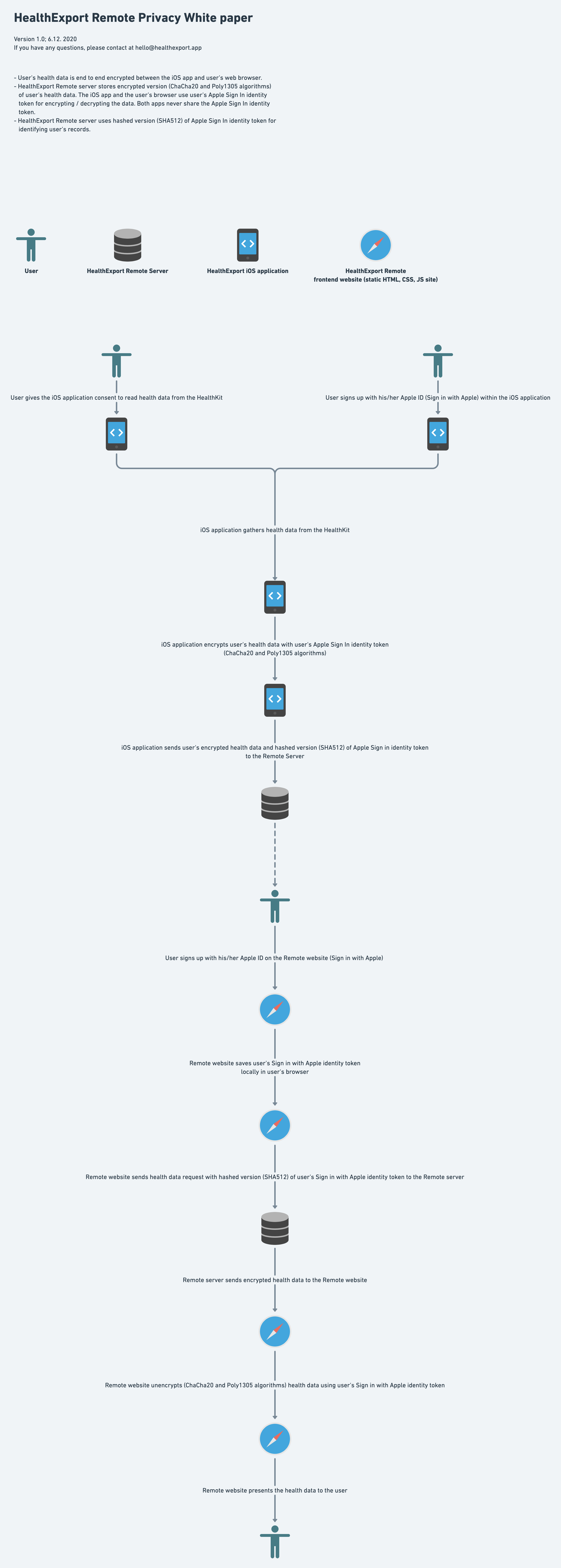
TL;DR: Health records are stored encrypted. The Remote website decrypts them in your browser. If you connect an AI assistant, HealthExport decrypts requested records in server memory and sends results to your selected AI service after your consent. The app does not collect any analytics or crash data.
The browser-flow security diagram describes direct browser access. For hosted AI processing, see MCP privacy details.
HealthExport Remote lets the user share health data with another person (for example a doctor) by sharing user’s account key. See the data sharing section for more information. The account key cannot be revoked or changed, so the User should be careful with their account key and never share it with an untrusted person. When health data is shared with another person, the data is end-to-end encrypted between user’s phone, user’s browser, and the browser of the person that has been given the account key by the user.
You can share access to your health data with another person (for example a doctor). To share your data, send the person your account key. Be extremely careful with your account key! The key cannot be revoked in the future. Once you send the key to someone, the person can read all of your health data.
To get your account key, or to connect an account key of another person, go to Settings → Data sharing on the Remote website.
Both, depending on which part you use:
I would like to offer Remote as a free feature to all HealthExport users, but there are monthly costs associated with running and maintaining the Remote server. A monthly subscription is unfortunately the only financially sustainable business model for me at this moment.
Yes, you can cancel the subscription at any time. For more information see the guide on Apple’s website. If the subscription is canceled, you will retain access to HealthExport Remote for the rest of the prepaid time period. Your access to the HealthExport Remote website will be revoked when the subscription ends.
Refunds for App Store purchases — both the app and Remote subscriptions — are handled by Apple, not me directly. You can request a refund through Apple at reportaproblem.apple.com.
Yes, it’s possible to license HealthExport Remote for business use (for example as a fitness coach or a clinic). For more information about business use please reach out at hello@healthexport.app.
At this moment, Remote supports all data types found in the mobile application except:
I plan to add support for these types as soon as possible.
HealthExport syncs regularly in the background, but the exact timing is managed by iOS and can vary.
Yes. The mobile app has a manual upload feature, which allows you to manually upload health data from a selected time period.
Yes, there is an API.
The Remote REST API returns encrypted records for client-side decryption. Hosted MCP is a separate interface: after Apple sign-in and consent, it decrypts requested records in server memory and returns results to your AI client.
API documentation: remoteapi.healthexport.app/api/v2/docs
Yes. For Claude, the Codex app, or another compatible AI client, connect hosted MCP with a URL and Apple sign-in. For coding agents, Terminal and scripts, use the open-source CLI.
The CLI fetches encrypted health records and decrypts them locally on your machine after you authenticate it with your account key.
You can find the CLI repository and installation instructions on GitHub.
Yes. Apple Watch measurements reach Apple Health on your iPhone, then HealthExport uploads the types you authorize to Remote. Add https://mcp.healthexport.app/mcp in your compatible MCP client, sign in with the same Apple account and approve read-only access. Clients include Claude, the Codex app and other compatible remote MCP clients. Claude Desktop has been tested with HealthExport; other clients have not yet been verified end to end.
See the Apple Watch and Apple Health MCP guide for requirements, privacy details, example questions, and setup.
You need HealthExport on iPhone, HealthExport Remote for uploads, uploaded records and a compatible AI client. Your AI provider's account requirements apply. Hosted setup needs no CLI installation or account key to paste.
After Apple sign-in and consent, HealthExport decrypts requested records in server memory and sends the results to your AI client and its provider. Customer decryption keys are not stored in the MCP database. Review your AI provider's privacy settings before connecting.
MCP reads previously uploaded records. It cannot trigger an iPhone sync, and background upload timing depends on iOS. Check your Apple Health permissions, use the same Apple account, and upload missing dates through Remote → Manual data upload on iPhone.
Each query supports up to 7 days, 4 types and 2,000 records. Narrow the request if it exceeds these limits. The supported-type catalog does not prove that your account contains records for every type.
Yes, HealthExport works with Apple Shortcuts — with one important limitation: iOS doesn’t reliably grant access to Health data while the phone is locked, so fully unattended, time-scheduled exports may fail.
For reliable background automation, HealthExport Remote is a better fit — it syncs in the background and you can pull data via its CLI or API at any time.
Still have a question? Email hello@healthexport.app.